mirror of
https://github.com/carbon-language/carbon-lang.git
synced 2026-09-30 10:05:00 +01:00
 Mats Larsen
8ba4916ab4
Mats Larsen
8ba4916ab4
TextMate is the go-to definition language for syntax highlighting for editors lack dedicated language support for a given programming language. This patch contains a very minimal, yet functional TextMate bundle definition for Carbon. This allows Carbon users to import the TextMate bundle into their editors to get basic syntax highlighting for Carbon code until we have a more solid specification for the language (that's when the fun with dedicated plugins/extensions begins!). **Support** - String literals with escape codes (currently using C highlighting rules) - Numeric literals in decimal, hexadecimal and binary (lacks _ separator support though) - Single and multi-line comments - Highlighting of all? (let me know if some are missing) keywords in the language Here is an image of the highlighting in action in IntelliJ Dracula mode 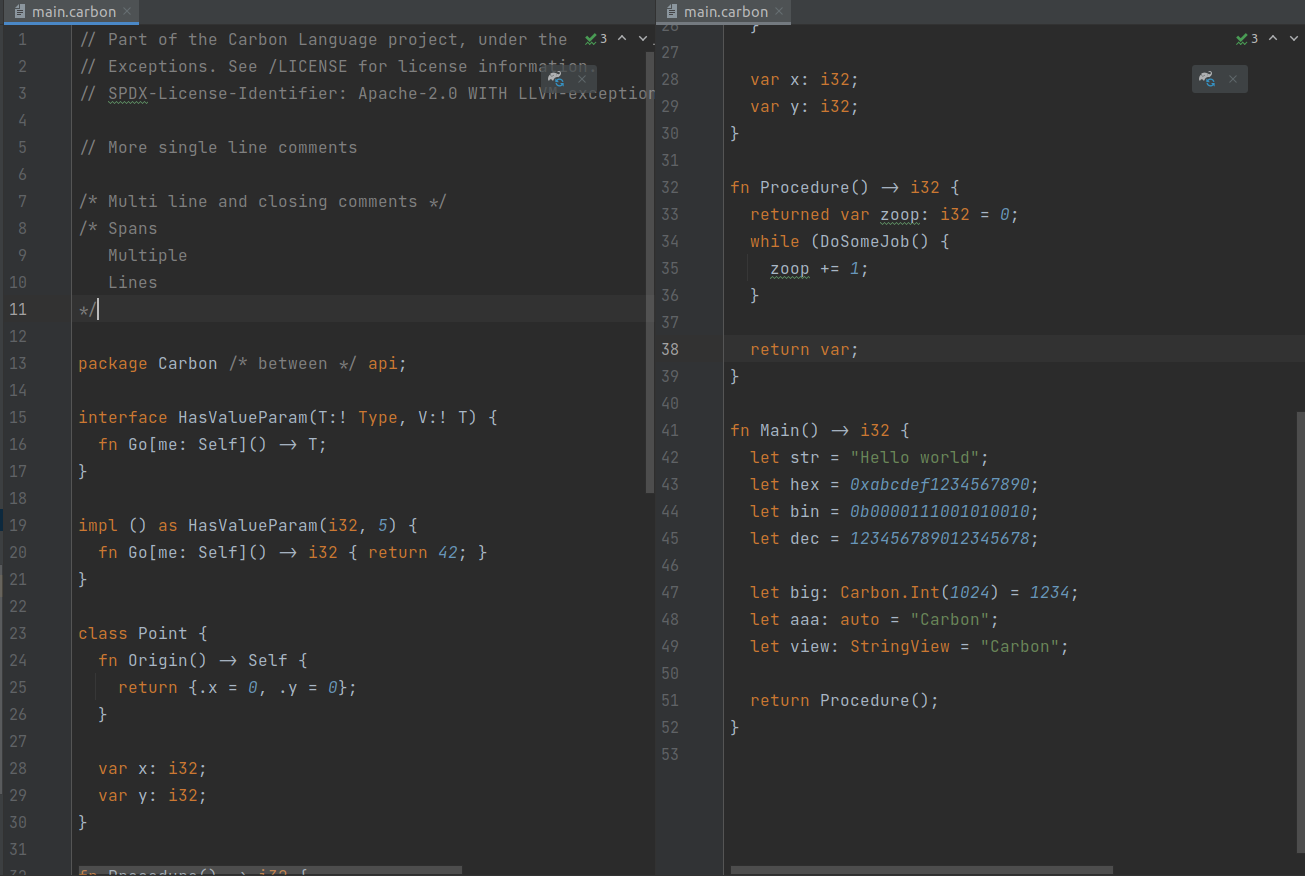

30 lines
1.4 KiB
Markdown
30 lines
1.4 KiB
Markdown
# Textmate Language Definition
|
|
|
|
<!--
|
|
Part of the Carbon Language project, under the Apache License v2.0 with LLVM
|
|
Exceptions. See /LICENSE for license information.
|
|
SPDX-License-Identifier: Apache-2.0 WITH LLVM-exception
|
|
-->
|
|
|
|
This directory contains a [TextMate](https://macromates.com/) bundle which can
|
|
be used in various editors such as TextMate, Atom, or the IntelliJ family for
|
|
syntax highlighting of Carbon source files.
|
|
|
|
If you are using TextMate, see the documentation on
|
|
[how to install TextMate bundles](https://macromates.com/manual/en/bundles#getting_more_bundles).
|
|
Clone the repository with Git and symlink/copy the `utils/textmate` directory to
|
|
any of the paths TextMate will search through (you can find these paths in the
|
|
TextMate documentation above).
|
|
|
|
If you are using IntelliJ or a IntelliJ Platform product, you can find
|
|
documentation on
|
|
[how to install TextMate bundles in IntelliJ](https://www.jetbrains.com/help/idea/textmate.html#import-textmate-bundles).
|
|
Clone the repository with Git and open the `utils/textmate` directory inside the
|
|
IntelliJ TextMate Bundle window.
|
|
|
|
If you are using Atom, you can convert the bundle to an Atom-compatible one. See
|
|
[the Atom documentation on how to do that.](https://flight-manual.atom.io/hacking-atom/sections/converting-from-textmate/)
|
|
|
|
For other editors that support TextMate bundles you can consult your editors
|
|
documentation to see how to use the bundle.
|