This is a re-do of #7888

Outside a call, the grammar scoped a name as a type or a variable by its
capitalization. A theme could not distinguish a type from a value with
the same spelling, or a parameter, a member, or an implemented interface
from any other name. Pointer member access `->` was scoped as a result
arrow, which scoped `Lookup` in `regions->Lookup(x)` as a type.

`entity.name.type` now applies only in a type position (after `:`, `->`,
`as`, `adapt`, or `require`, or in an `impl`) and to the name a nominal
declaration declares. A qualifier, in a declared name like `fn N.Base(T:
type).F()` or in a type, is `entity.name.scope-resolution` nested in
`entity.name.type`. As in the parser, a name is a qualifier when its
parameter lists are followed by `.`. Parameters, `let` bindings, choice
alternatives, members, implemented interfaces, primitive types,
`import`, and the strings naming a builtin or a library have their own
scopes, and brackets use the C++ grammar's scopes. A `->` written
directly after its operand is member access; no result arrow in the
repository is written that way.

The sample palette renders each scope that depends on context
differently, and `tmlanguage.py` now supports nested captures.

In 17 of the 19 themes measured, the VS Code built-ins plus One Dark
Pro, Night Owl, Tokyo Night, and Nord, 13% to 27% of the characters in
hand-written Carbon change color or style. A theme loses a color where
`.` is now punctuation, where word operators like `as` are no longer
control-flow keywords, or where a name outside a type position is no
longer a type.

Assisted-by: Claude Code
The sample renderings used VS Code's Dark+, which renders many scopes
identically, so a grammar change often doesn't show up in the images.
Dark+ gives the 42 scope stacks the samples produce 10 distinct
renderings: types, namespaces, builtin types and classes share one
color, and operators and separators stay at the default foreground, so a
rule that moved a token between them changed nothing visible.

`render_sample.py` now uses its own palette. Each family of related
scopes, such as the numeric literals, gets one color, and bold and
italic distinguish the scopes within a family; the renderer now emits
font styles to support this. The samples' 34 scopes get 32 renderings;
only the two embedded C++ spellings and a string's opening and closing
quotes share one. Unscoped text is dimmer than any scope's color, so
`0o8` renders as an octal `0o` followed by an unscoped `8`. The colors
are Catppuccin Mocha's, and each has at least 4.4:1 contrast against the
background.

No existing theme does this: across 264 theme files, the 19 VS Code
built-ins plus 30 popular extensions, the best renders 19 of the 42
stacks distinctly.

Assisted-by: Claude Code
Outside a call, the grammar scoped a name as a type or a variable by its
capitalization. A theme could not distinguish a type from a value with
the same
spelling, or a parameter, a member, or an implemented interface from any
other
name. Pointer member access `->` was scoped as a result arrow, which
scoped
`Lookup` in `regions->Lookup(x)` as a type.

`entity.name.type` now applies only in a type position (after `:`, `->`,
`as`,
`adapt`, or `require`, or in an `impl`) and to the name a nominal
declaration
declares. A qualifier, in a declared name like `fn N.Base(T: type).F()`
or in a
type, is `entity.name.scope-resolution` nested in `entity.name.type`. As
in the
parser, a name is a qualifier when its parameter lists are followed by
`.`.
Parameters, `let` bindings, choice alternatives, members, implemented
interfaces, primitive types, `import`, and the strings naming a builtin
or a
library have their own scopes, and brackets use the C++ grammar's
scopes. A
`->` written directly after its operand is member access; no result
arrow in
the repository is written that way.

The sample palette renders each scope that depends on context
differently, and
`tmlanguage.py` now supports nested captures.

In 17 of the 19 themes measured, the VS Code built-ins plus One Dark
Pro, Night
Owl, Tokyo Night, and Nord, 13% to 27% of the characters in hand-written
Carbon
change color or style. A theme loses a color where `.` is now
punctuation, where
word operators like `as` are no longer control-flow keywords, or where a
name
outside a type position is no longer a type.

Assisted-by: Claude Code
The images beside the samples were screenshots taken by hand, so they
drifted: they still showed `package Carbon api;`, syntax the language
dropped in 2024.

`render_sample.py` renders a sample the way the grammar in this
repository actually highlights it, using `tmlanguage.py`, a small
TextMate tokenizer. VS Code runs grammars under Oniguruma, which we
cannot depend on here, but this grammar uses no Oniguruma-only syntax,
so `re` runs its regexes unchanged and the two agree on every character
of every Carbon file in the repository. The output is SVG, so
regenerating needs nothing but Python, and a later grammar change gets a
same-path image diff showing what it did to real code.

The samples change where a construct left the language (`api`, `Carbon`
as the package name, `StringView`, `destructor`), refresh the
`keywords.carbon` inventory against `token_kind.def`, and add sections
for octal, raw and block literals, character literals, lambdas, and raw
identifiers. `interop.carbon` is new, covering inline C++. These are
highlighting fixtures rather than programs, so the deliberately invalid
lines stay.

Assisted-by: Claude Code

---------

Co-authored-by: Dana Jansens <danakj@orodu.net>
TextMate is the go-to definition language for syntax highlighting for editors lack dedicated language support for a given programming language. This patch contains a very minimal, yet functional TextMate bundle definition for Carbon.
This allows Carbon users to import the TextMate bundle into their editors to get basic syntax highlighting for Carbon code until we have a more solid specification for the language (that's when the fun with dedicated plugins/extensions begins!).
**Support**
- String literals with escape codes (currently using C highlighting rules)
- Numeric literals in decimal, hexadecimal and binary (lacks _ separator support though)
- Single and multi-line comments
- Highlighting of all? (let me know if some are missing) keywords in the language
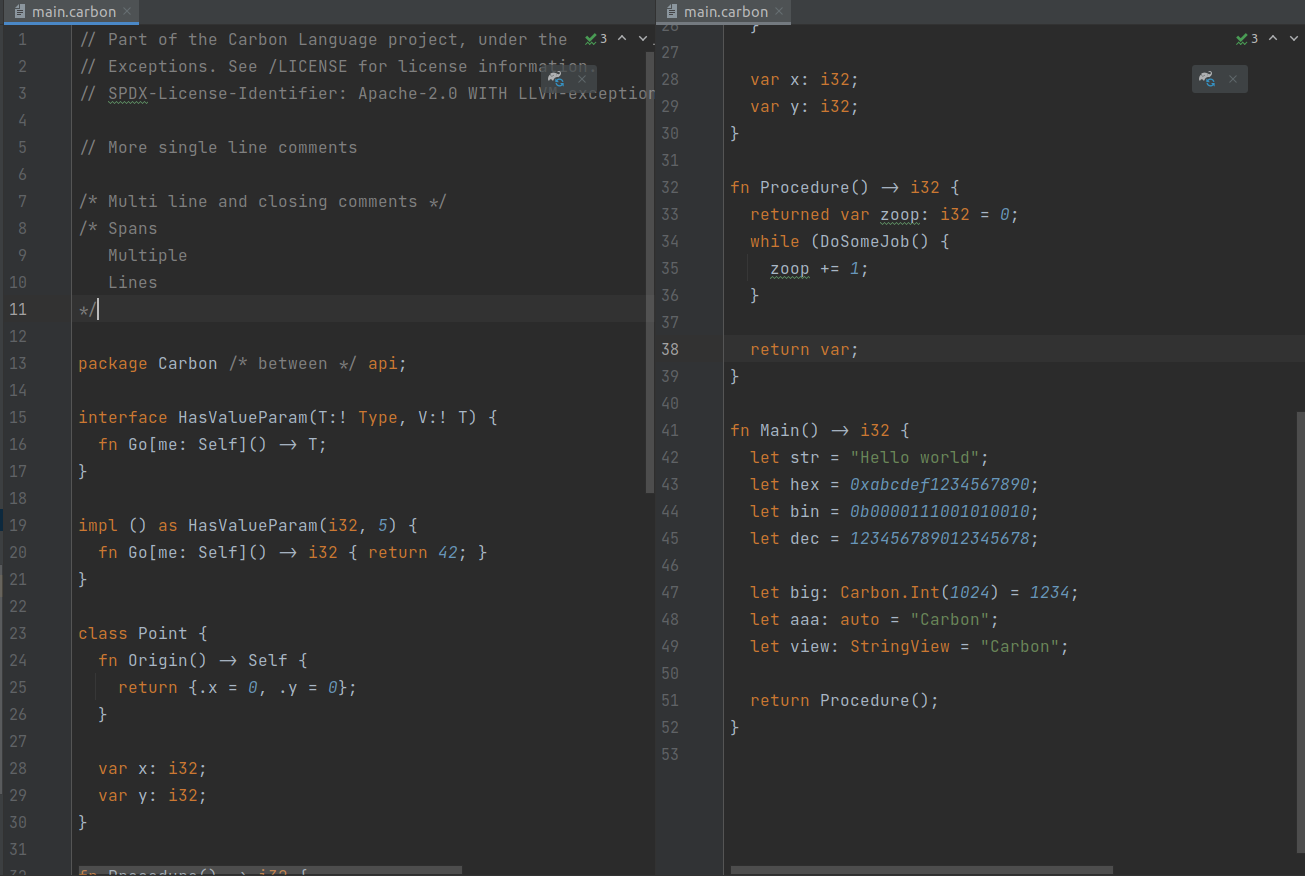
Here is an image of the highlighting in action in IntelliJ Dracula mode
 Chandler Carruth

 maan2003
 Mats Larsen
